DNP DS-RX1HS Printer
Product details
The business kick-starter for high impact printing!
The RX1-HS printer is one of the prime choices for Photo kiosks and Photobooths, it combines a low cost per print with a economical price of the unit, whilst retaining a superb quality of prints and high speed printing.
The HS-RX1 being one of the most recently released units is fast becoming the industry workhorse, and has a multitude of optional add-ons that can help generate and increase sales.
RX1 Speed Update - using the HS media
DNP has released the new HS media for the RX1, this can improve the RX1 print speed.
To use the new media the printer must be updated to FIRMWARE v2.04 or greater. Also please note, once you have updated to the new firmware you are only able to use the HS media kits.
Matte and Gloss on same media
6"x2", 6"x4" and 6"x8" (or 3.5"x5" and 5"x7")
6x2 prints for Photobooth operations
Small footprint: 322(W)x 281(High)x 351(D) mm
Fast print speed: around 15sec/print for 6x4 (11sec high Quality, 8 sec at low)
450 prints per hour at low res
Weight: 14Kg
Front Loading
Roll-fed
Windows Xp, Vista, 7, 8 Drivers available
Mac 10.5, 10.6, 10.7 and 10.8 drivers available
Optional Hot folder software (Free)
Optional Printer Monitoring software (Free)
Optional Mobile Phone printing (Mobile Party Print)
Optional Camera wireless to printer package (eg for Santa or School balls)
Optional Kiosk and passport software see the DNP Photo Kiosk software
The ability to use 6x4 media to make 6x2 photo strips makes the RX1 idea for Photo Booths. It is by far the most popular printer in NZ photo kiosks, Photo booths and businesses requiring high volume instant prints. The popularity of this unit ensures the media remains the most cost effective of all models.
Accessories
RX1 and RX1-HS rolling travel / flight Case
This Printer Case is Hybrid Part ABS Laminate and part Flight case panel with that is one of the lightest heavy duty printer cases on the market, it is compact Foam Padded and
Low profile pull-out Recessed metal latches
Low Profile wheels
Pull-out rolling handle
Etha Foam padded interior
9mm high pressure Laminated plywood
Dimensions 444 x 415 x 448mm
approx 5kg.
RX1 Hot folder
The hot folder utility will enable the printer to automatically print any file that you save to the specified folder in Windows that the Hotfolder utility monitors.
FEATURES:
HFP accommodates numerous print sizes for DS40, DS620A, RX1, and DS80.
HFP archives ALL of the images that it prints.
Ability to create custom borders, edit borders, and adjust color.
Modern, easy-to-navigate GUI
Use up to 6 DNP printers simultaneously
Detailed information for all connected printers
Customizable low media warnings
Color profile import option
Expanded language support
High resolution print mode (300×600)
Select number of copies (simplex)
Matte print mode
HFP allows users to control color settings including Auto Correction, RGB, Gamma, Contrast, Brightness, Saturation, and Sharpness. Utilize individual channel control or move channels together. Quickly revert to default settings.
DNP Mobile Party Prints
Print from Mobile devices (Android and Apple) to your DNP printer wirelessly
Optional Add-on for the RX1 printer
Customers download free App on their phone (DNP Party Print)
Customers take photo at wedding/School Banll, and send wirelessly to the Party Print manager PC
Can automatically add borders to all photos
Open release or select release of print
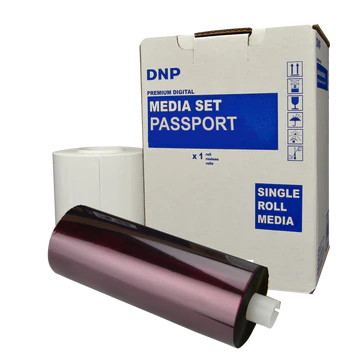
DS-RX1 Media
The RX1 has been designed as a kiosk printer, the front loading makes loading easy when the unit is mounted inside a kiosk, or under a counter. The high volume per roll of media (700 prints/roll using 6x4) is well suited to uses where frequent media changing is not required.
Media kits include ribbon and paper, please replace both when doing a media change.
RX1-HS | RX1 | |
Resolution: | 300x600 ; 300x300 | 300 x 300 |
Print Size: | 2″x6″*, 4″x6″, 5″x7″**, 6″x8″ | 2″x6″*, 4″x6″, 5″x7″**, 6″x8″ |
Print Speed: | 12.4 sec/print (2″x6″*) | 14.9 sec/print (2″x6″*) |
12.4sec/print (4″x6″) | 14.9 sec/print (4″x6″) | |
19.9 sec/print (5″x7″**) | 23.9 sec/print (5″x7″**) | |
21.9 sec/print (6″x8″) | 26.9 sec/print (6″x8″) | |
Paper: | 1400 sheets/roll (2″x6″*) | 1400 sheets/roll (2″x6″*) |
700 sheets/roll (4″x6″) | 700 sheets/roll (4″x6″) | |
350 sheets/roll (5″x7″**) | 350 sheets/roll (5″x7″**) | |
350 sheets/roll (6″x8″) | 350 sheets/roll (6″x8″) |
*uses 6x4 media to produce 6x2 prints.
The RX1 and RX1-HS use the Same media
4"x6" 2 rolls per box (1400 prints) | 5"x7" 2 rolls per box (700 prints) | 6"x8" 2 rolls/box (700/box) |
Media is available in boxes containing two ribbons and two paper rolls each.
RX1 6x2 Cut Settings (Photobooth)
Photobooth users can setup the 6x2 cut as default as follows
In Windows (or Control panel) go to Devices and printers, and double click on the RX1 printer.
Click on Printer in the top left corner
Then click on properties
In General tab click on Printing Preferences (In Windows 7 it is only called Preferences)
Under Layout Click Advanced
Set Paper Size to [PR (4×6)]
Under Printer Features Go to 2 inch cut: and change to (Enable (Printer V1.10 or later)
Click OK, Apply, OK and OK, then do a test print.
Be sure that your printer has firmware v1.10 or later.